Skip to content
In development Planned launch Q1 2027
Katanga

A closer look / The product tour

Less chasing.
More getting
things done.

Step inside a working day with Katanga. From the first call to the final handover, see how the details stay with the job.

Take the tour

Real development-build screens. Fictional garage, customers and vehicles.

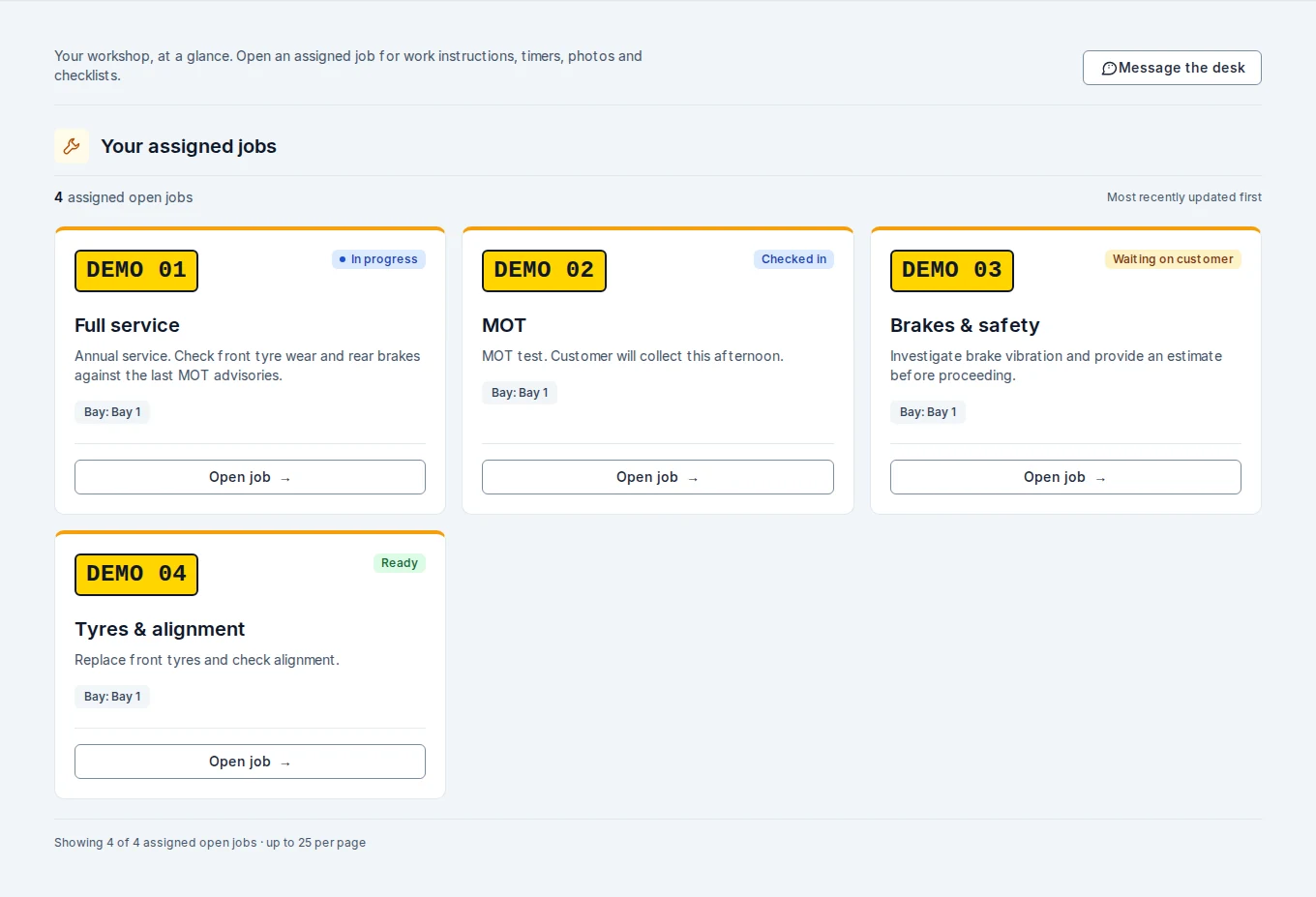
The workshop, connectedProduct preview
My jobsDemo garage
Technician job cards showing four fictional vehicles, work descriptions, bays and status badges.
A clear next step for every assigned job.
ReceptionWorkshopCollection

01 / A good start

The phone rings.
You’re already ready.

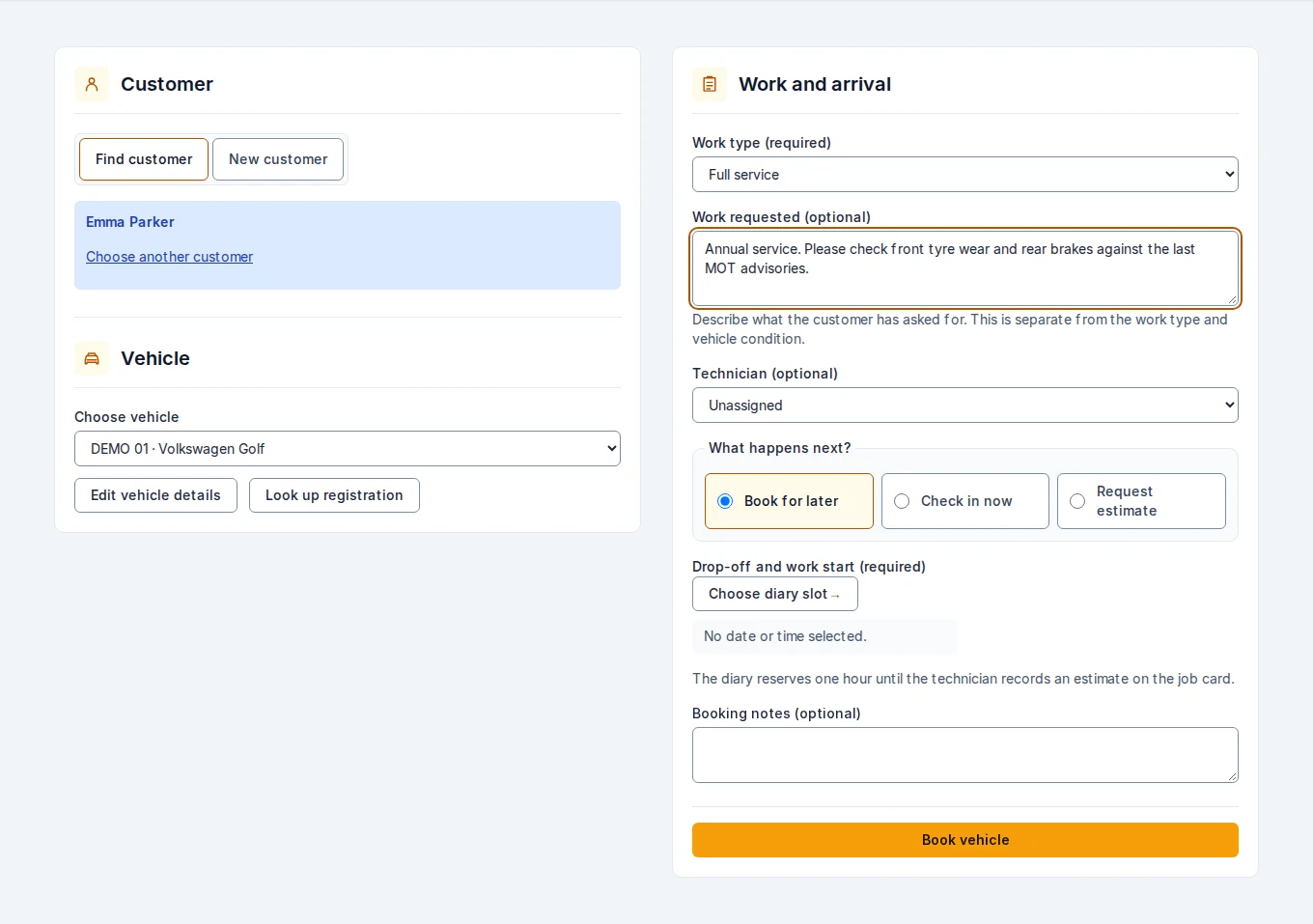
Find the customer and their vehicle, capture the work requested, then book a slot, check the car in or request an estimate. One intake. The whole story.

  • Existing customer or first-time caller
  • Vehicle details beside the work requested
  • A clear choice of what happens next
Reception / Customer to bookingDemo garage
Reception intake populated with Emma Parker, a fictional vehicle and an annual service request.
Customer, vehicle, work and arrival — together in one reception workspace.

02 / Find the room to do it well

Today in detail.
The week in perspective.

Give every booking a place in the day. See technician lanes when the workshop is busy, then step back to spot the shape of the week.

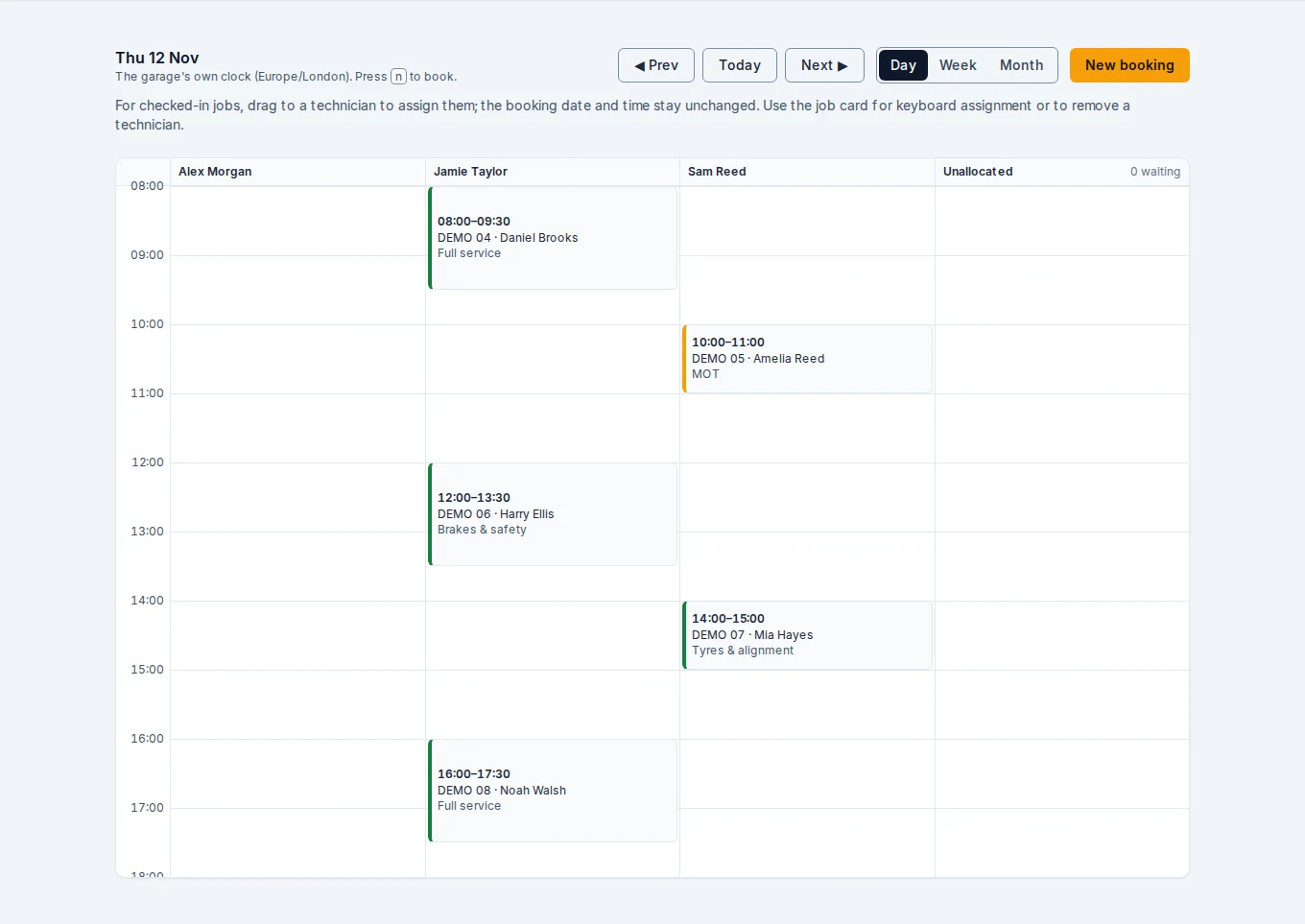
Diary / Day viewDemo garage
Day diary with timed bookings arranged in technician lanes for Jamie Taylor and Sam Reed.
The day view puts time, technician and vehicle in the same picture.

Ways to see the same working week.

No separate lists to reconcile. Day and week views draw on the same bookings.

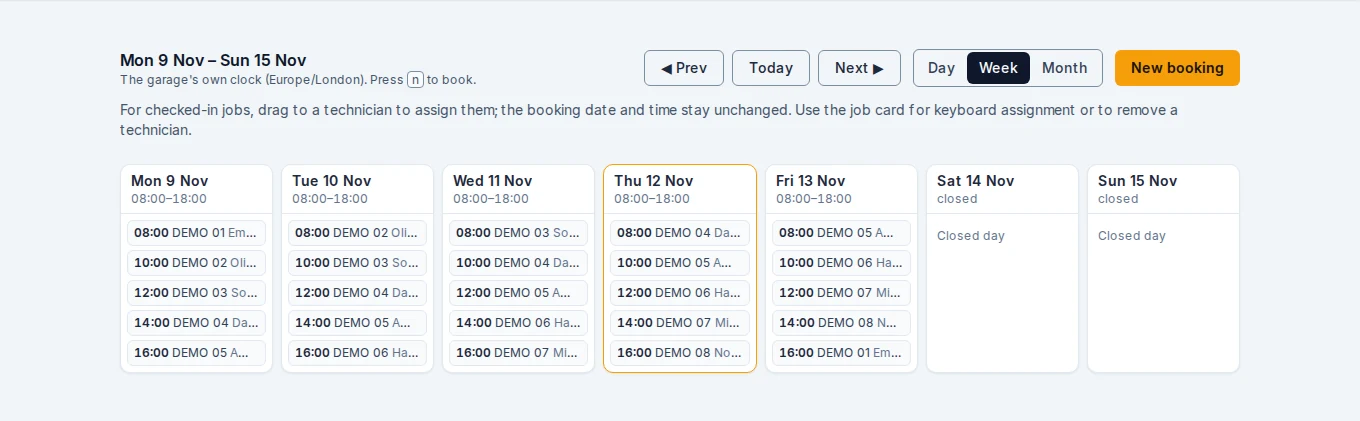
Diary / Week viewDemo garage
A populated Monday-to-Friday week diary with twenty-five fictional bookings and closed weekend days.
A week of demo bookings. Select any screenshot to see it larger.

03 / From the desk to the bay

Same job.
The right view.

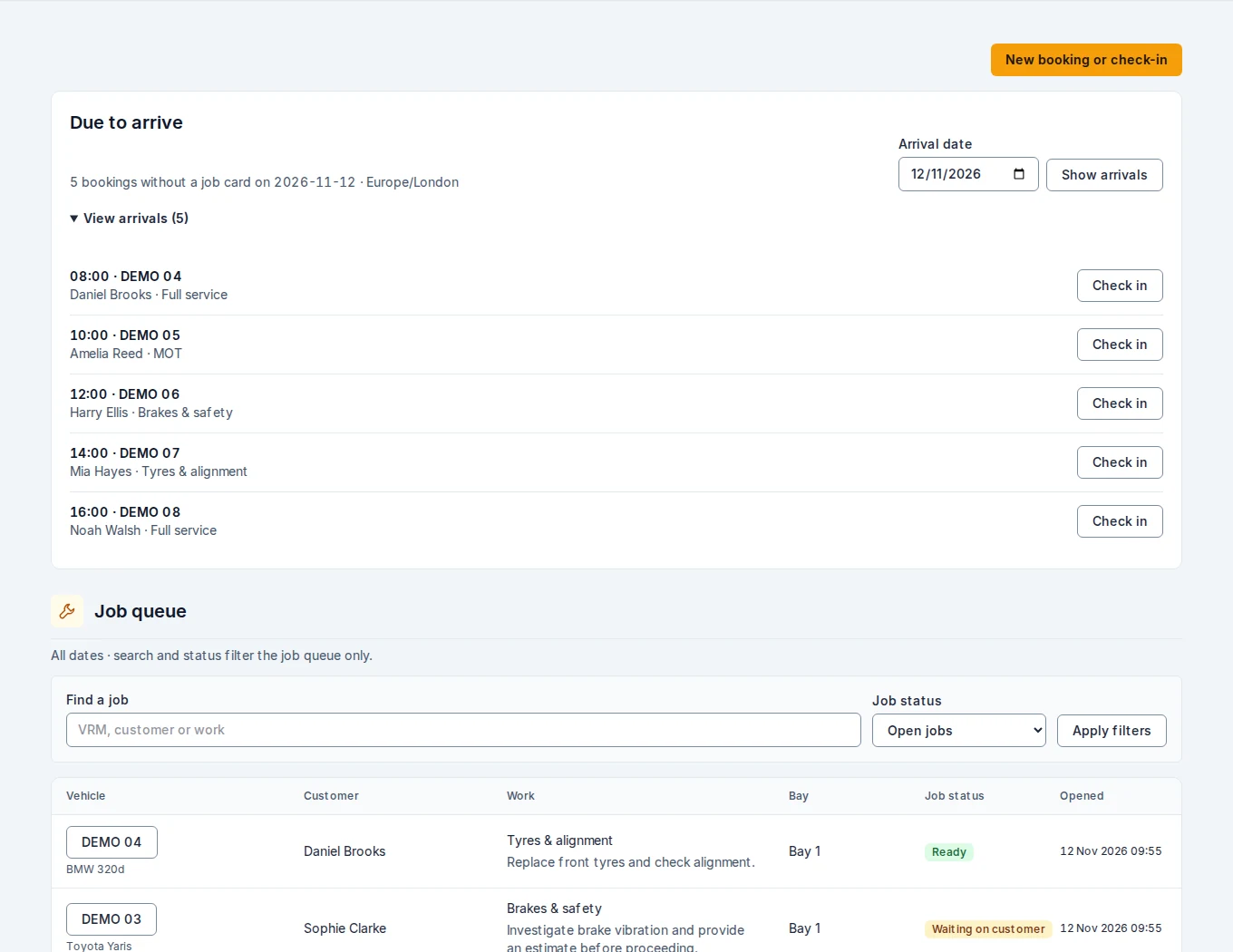
Reception needs the workshop picture. A technician needs the work in front of them. Katanga gives each role a focused view, with the job’s context kept together.

Jobs / The workshop queueDemo garage
Job queue showing fictional vehicles checked in, in progress, awaiting approval and ready for collection.
See what is moving, what is waiting and what is ready for the next step.

Built around the person doing the work

A job card that earns
its place in the bay.

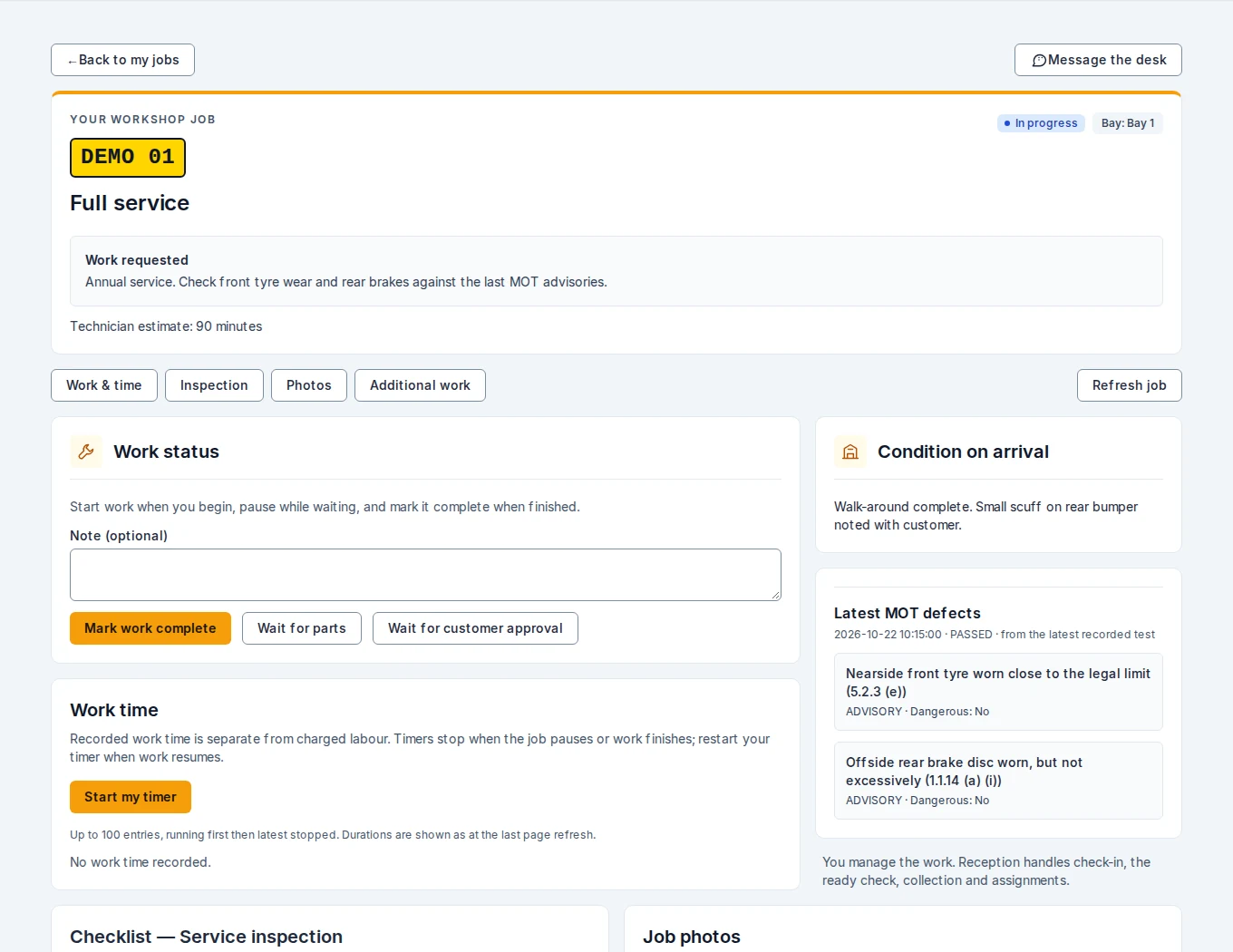
Work instructions, duration estimates, timers and status actions are grouped for the technician. Arrival notes and the latest recorded MOT defects stay close at hand.

  • Assigned jobs and clearly marked work states
  • Inspection checklists and private job photos
  • Additional-work requests back to reception
  • Quick links to each section of the job

Browser-based workspace. Online connection required.

My job / Technician workspaceDemo garage
Redesigned technician job detail showing work controls, work time, arrival notes and fictional MOT advisories.
The technician view: fewer distractions, more of the detail that matters.
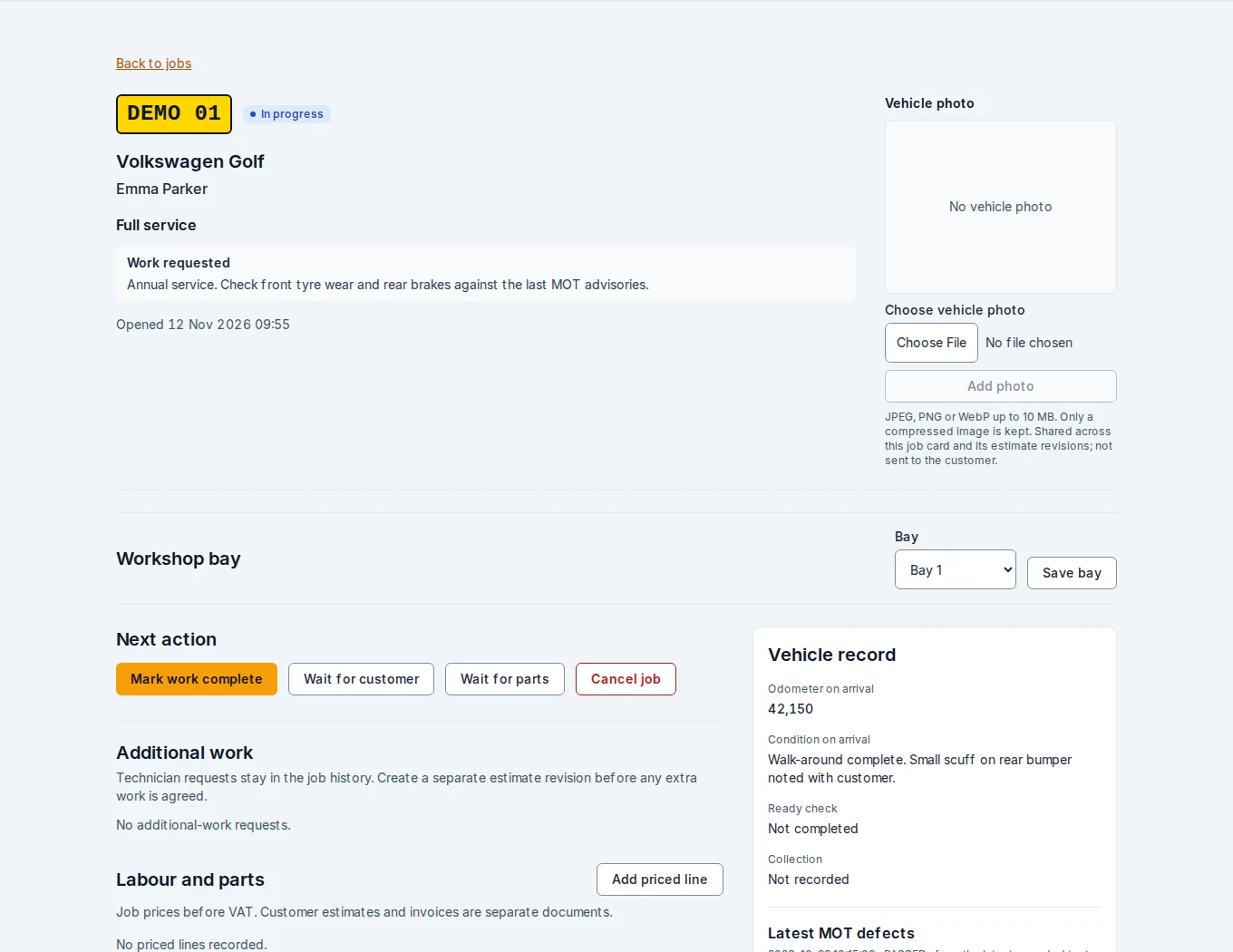
Take a closer look at the reception job card
Job card / Reception viewDemo garage
Reception job detail with work description, vehicle, assigned staff and workflow controls.
The desk retains check-in, assignments, ready checks and collection controls.

04 / Remember the details

Know the customer.
Understand the car.

Useful context starts before the bonnet goes up. Keep contact details, vehicle information and recorded MOT history within reach of the team.

Customer records

Less typing.
A better starting point.

Address autocomplete suggests addresses as you type, helping fill the address line, town and postcode. Manual entry is always available.
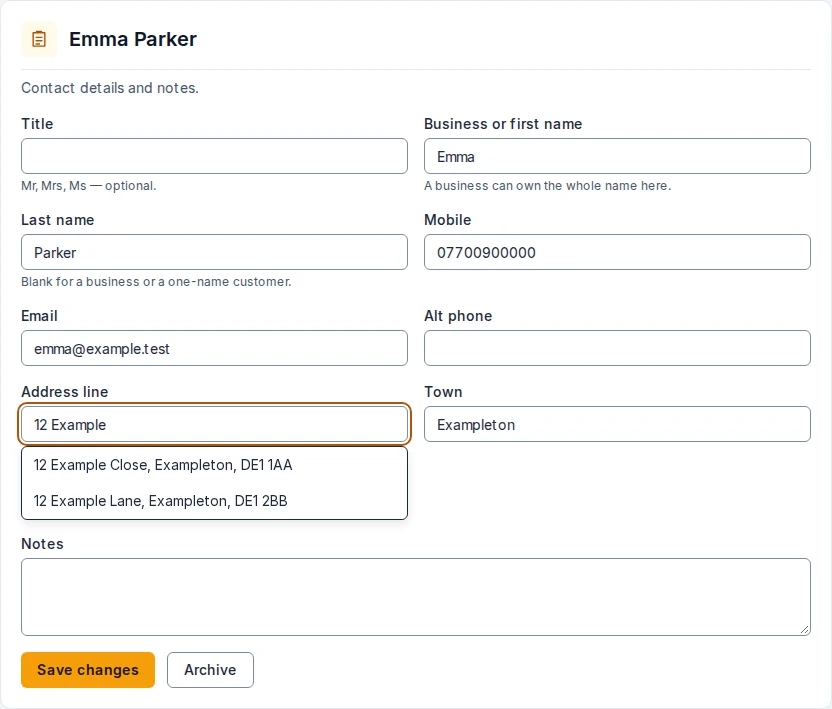

Customers / Address autocompleteDemo garage
Customer edit form with an address suggestion list beneath the address field.
Real address-suggestion UI with fictional demo suggestions. Provider configuration is required.
Vehicle context

The MOT history.
Not just the due date.

DVSA MOT History data brings test results, recorded mileage and defects into the vehicle record. Latest-test advisories also appear on the job, giving the technician a useful starting point.
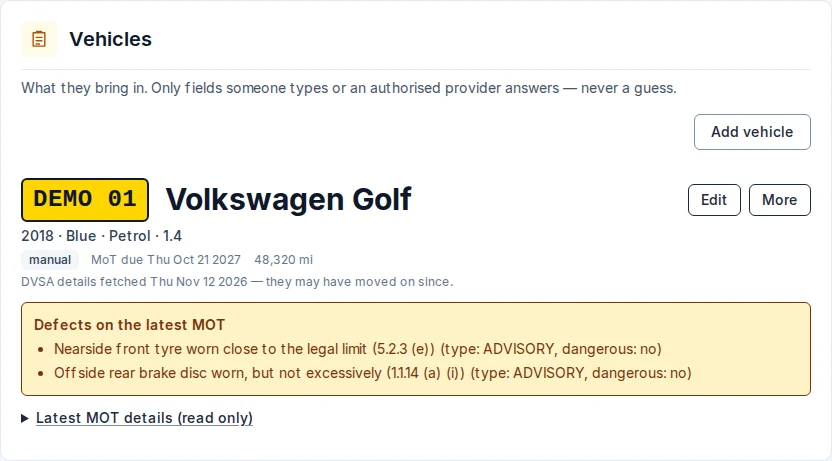
Vehicles / Recorded MOT detailsDemo garage
Fictional Volkswagen Golf vehicle record displaying MOT due date, recorded mileage and two advisory defects.
Illustrative MOT data for DEMO 01, not a real vehicle’s history. DVSA lookup requires provider configuration.

MOT history provides context; it does not replace the garage’s own inspection.

05 / Keep the conversation with the work

Across the workshop.
Without losing the thread.

“Can you quote the tyres?” “The customer has agreed.” Give the desk and technicians a shared place for those small, important handovers.

  • Individual technician conversations
  • Broadcasts to the whole workshop team
  • Job links, unread indicators and voice notes

These are internal team messages. Customer SMS and email delivery remain recording-only in the current build.

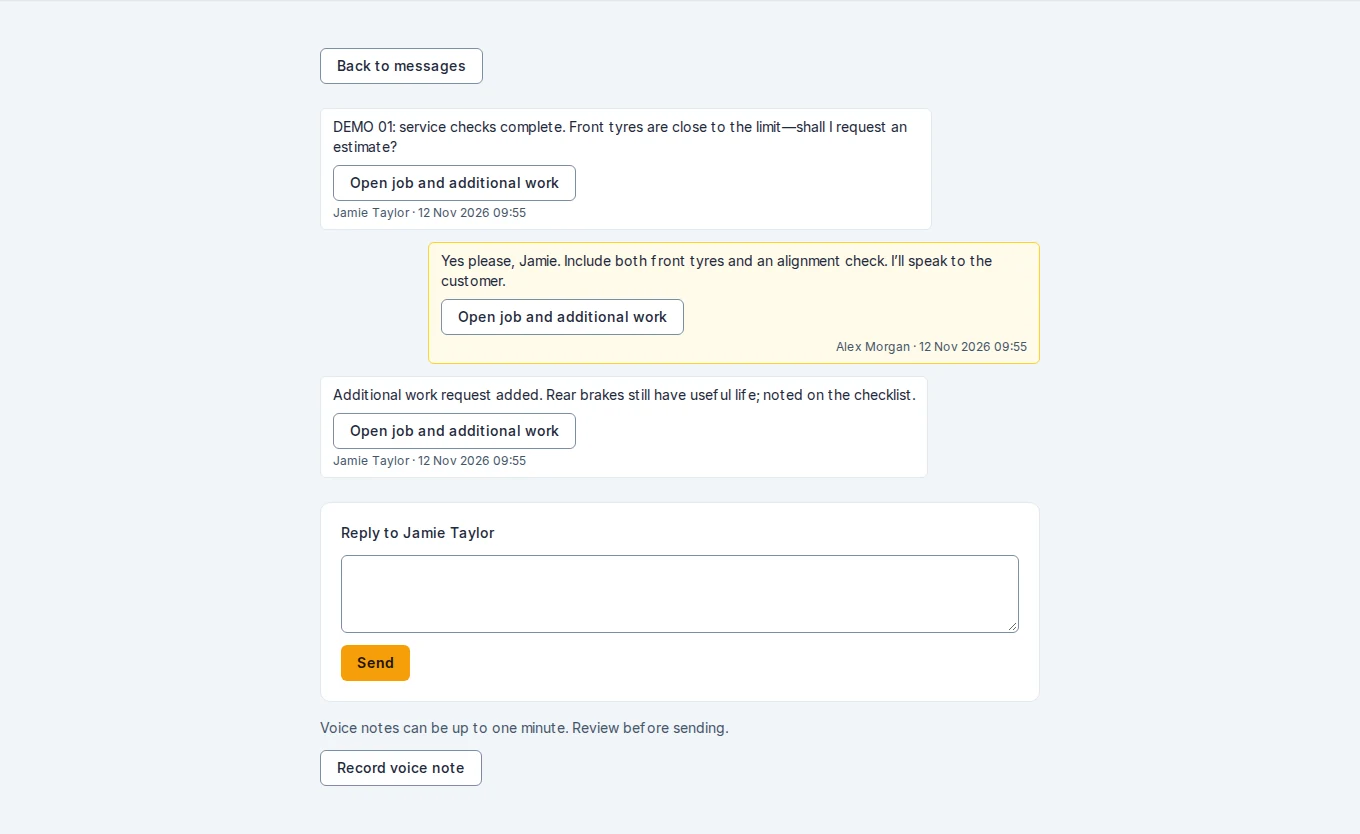
Messages / Desk ↔ technicianDemo garage
An internal conversation between Jamie Taylor and Alex Morgan about a fictional tyre estimate, with links back to the job.
A workshop conversation with the job one click away.

06 / Finish as clearly as you started

Agreed work.
Clear paperwork.

Keep estimate revisions, customer decisions and invoice balances connected to the job. Print the invoice at collection and record the payment taken by your garage.
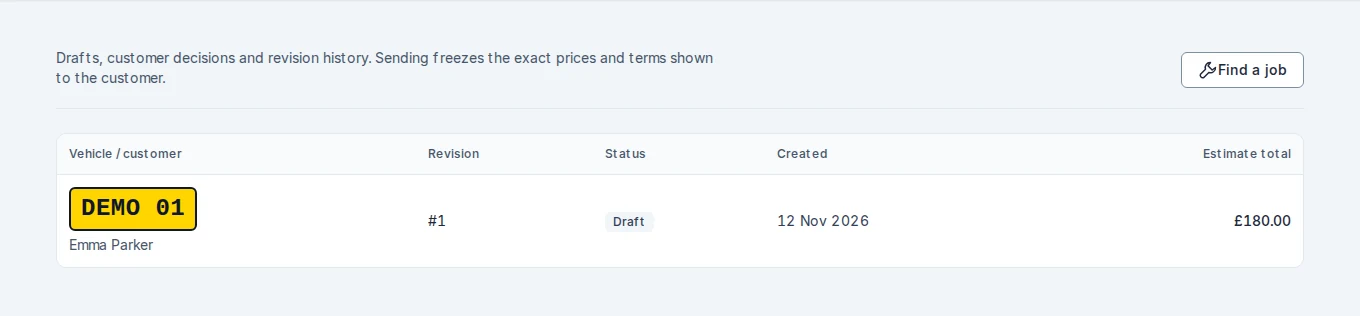
First, agree the work.

Estimates / Revision historyDemo garage
An estimate list with a fictional £180 tyre and alignment estimate.
Numbered estimate revisions preserve the scope of each agreement. This example is a draft.

Record phone and in-person decisions, or manually share an approval link to the exact revision.
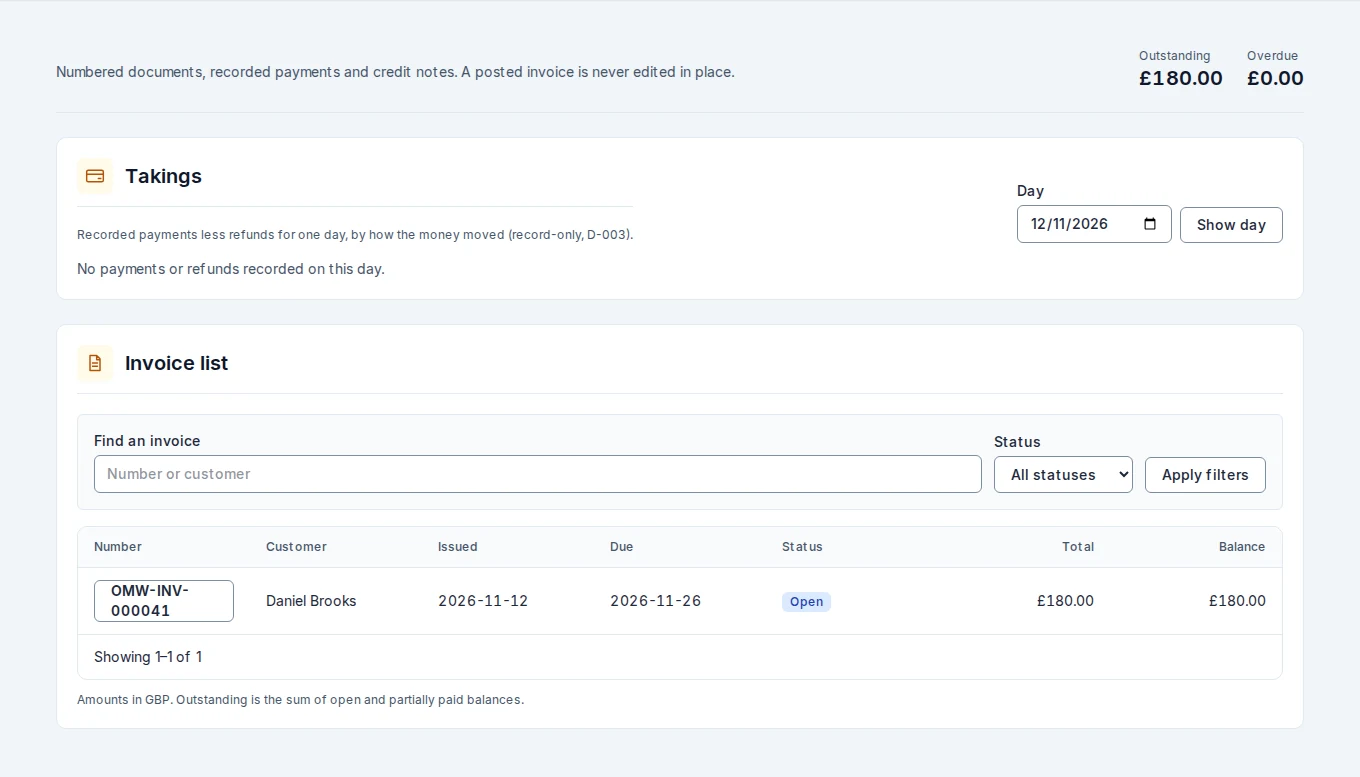
Then, make the handover simple.

Invoices / Outstanding balancesDemo garage
Invoice workspace showing a fictional £180 outstanding invoice for tyre replacement and alignment.
Track balances and record payments. Customer payments are taken outside Katanga.

Your garage. One connected day.

Picture your team
on the same page.

One location. Unlimited users. £65/month excluding VAT.
Planned launch Q1 2027.

See the plan

About these screenshots: captured from the development application in November 2026 using a fictional demonstration garage. Address suggestions and MOT records are illustrative data. Images are previews, not interactive app screens; features and appearance may evolve before launch.